
If you’re using one of our original checkout page templates (~ pre September 2025), then you may notice that non-shippable products still display shipping methods at checkout. This was fixed on newer checkout page templates.
This could be confusing to customers when they are purchasing a product that doesn’t require shipping such as a digital download.
How to Hide Shipping Methods on Non-Shippable Products
Go into your Webflow site checkout page and find the Shipping Methods section.
Wrap the entire section (“Shipping Method” title, radio options, etc.) in a div / section / container if it is not already.
Add a custom attribute to the wrapper with a value of “1”:
data-cg-checkout-shipping-method-form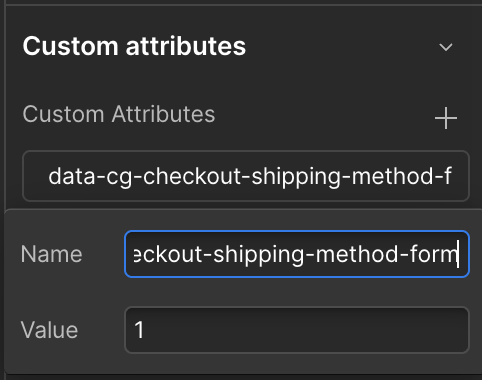
Done! Publish your site.
You should now not see the shipping methods for any non-shippable product.