The latest CartGenie checkout page template (since Sept 29, 2025) includes both a text input and a dropdown option for state / province field at checkout so simply pasting in our template will include both field types automatically!

The text input field is hidden by default (see layers screenshot below). It will inherit the same style as other text input fields. But if you would like to preview it, you can set to display:block in order to style and then set back to display:none.
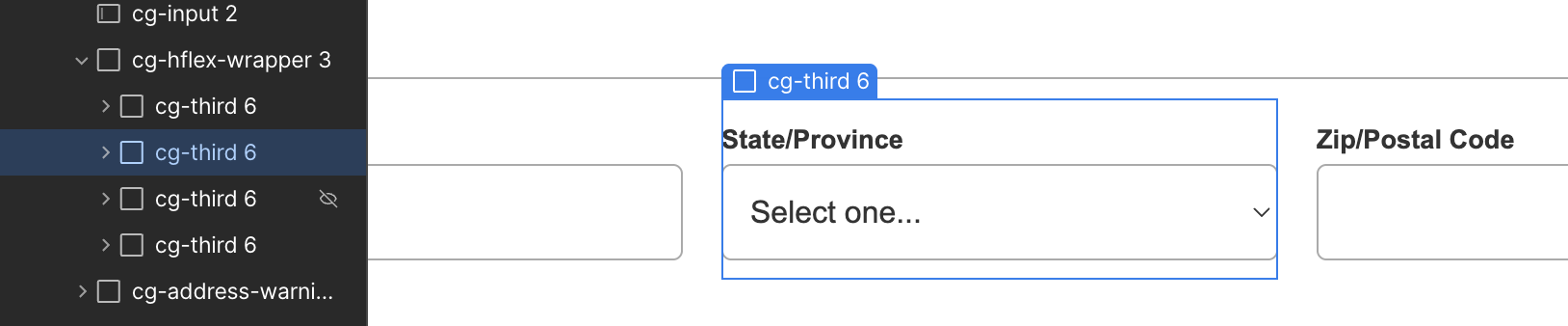
At checkout, if a customer selects to ship to the USA or Canada, CartGenie displays the dropdown with US states or Canadian provinces (more countries coming soon).
If any other country is selected at checkout, CartGenie will display the text input field type.
Previous template versions (pre sept 29, 2025) only included a single text input. If the US / Canada is selected, CartGenie will duplicate the country dropdown to populate with states if a state dropdown field was not found.
If you are using an older template and the duplication is causing layout issues, you can update your checkout page using our latest template or components.
Yes, the field is required to be present on the checkout page because many countries require it for delivery.
However, CartGenie does not make the field required to fill out for customers when shipping to most countries.
Only customers shipping to these countries are required to fill out the state / province field:
Argentina
Australia
Brazil
Canada
China
Colombia
India
Indonesia
Ireland
Italy
Japan
Malaysia
Mexico
Nigeria
Philippines
South Korea
Spain
Thailand
USA
Yes, you can rename the label above the State / Province field if you wish. This can be useful to match it to your region if you only ship to select countries (such as changing to “State” if only shipping inside the USA, etc.)
