If you’re experiencing any of these issues (especially on mobile phones), then this fix should clear up your display problems:
Product collection lists loading slowly / not at all
Product option dropdowns freezing
Scrolling on list page causes items to disappear
Images and text half loading on scroll

We’ve updated our page templates and components so that this issue will no longer occur for new users after this date – or people who replace their page templates.
If your site was build prior to this date, you may need to use one of the methods below to prevent this from happening. If your site was built after and you are still having issues, please contact our team to investigate.
All of these loading and site display issues are caused by Webflow’s "Cloudflare Turnstile spam protection". Webflow requires using form blocks in order to add form elements such as our text inputs, etc. Cloudflare Turnstile adds a widget instance for each one of these form blocks, which causes slow load times and other issues.
If your category list page uses our Product Card with Options dropdowns template, then your collection page likely has a ton of form blocks on it, which causes more dramatic loading problems.
In Webflow, go to your Site Settings > Apps & Integrations page and find the Cloudflare Turnstile spam protection section.
Turn OFF the “Bots are being blocked” option. This is the root cause of the issues.
(If you don’t want to turn off bot blocking, then use method 2.)
Then Republish your site and your issues should be resolved!
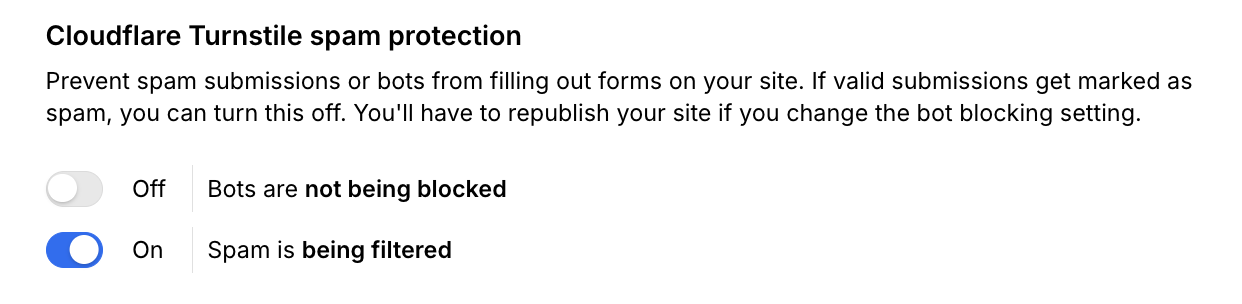
When it is off it should look like the screenshot above.
If you want to keep Cloudflare’s Turnstile’s bot blocking enabled, then there is another way to fix this issue – it just takes a few extra steps.
In Webflow, go through your store pages (especially the list pages) and find every Form Block that is in a CartGenie section.
Inside each form, select the Form layer (not the Form Block itself)

Add a new custom attribute to it (in the layer settings panel)
Name: data-wf-no-turnstile
Value: 1
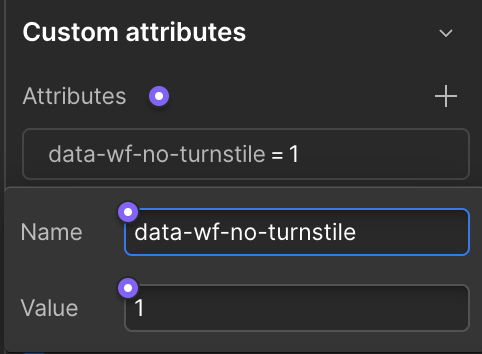
Repeat these steps for every Form inside of a CartGenie section – or any form that you don’t want Cloudflare’s Turnstiles to be applied to.
Webflow was gracious enough to code in this quick fix just for us!
