
CartGenie allows you to notify customers prior to each renewal charge for a subscription. This let’s you keep customers aware of when they will be charged in case they want to make any changes prior to the renewal date.

To edit this email, go to CartGenie Settings > Communications > Subscription Renews Soon email box and click the Edit button.
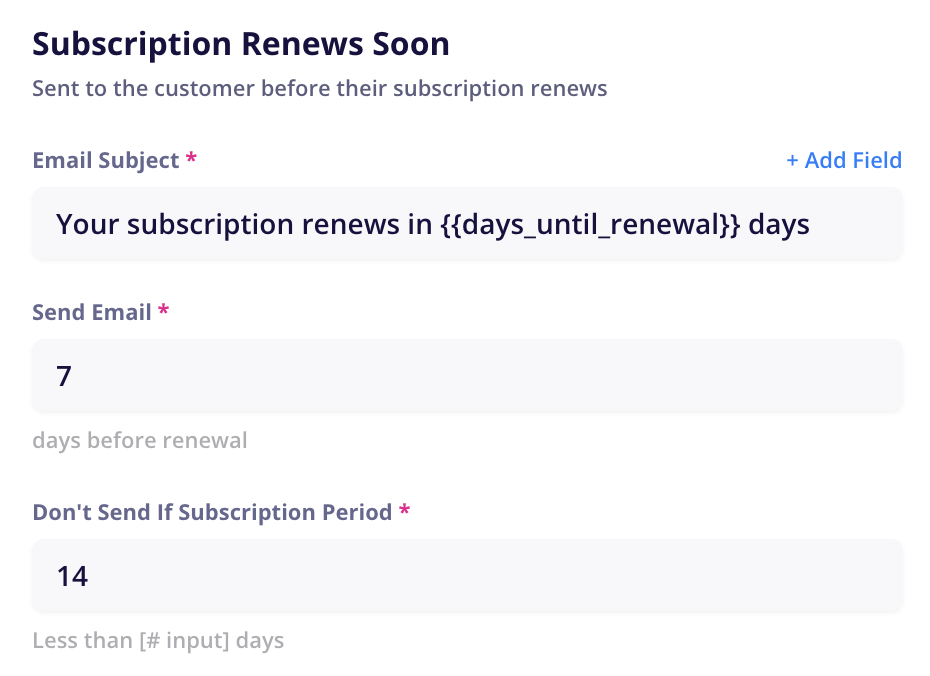
Here you can determine how long before the subscription renewal date should your email be sent to the customer.
Send Email ____ Days Before Renewal
This field determines how long before their renewal date the email will be sent (default = 7 days)
Example: A subscription renewing on Jan 17 would be sent on Jan 10
Don’t Send if Subscription Period Less than ___ Days
This field will not send the email if the customer’s subscription’s interval is shorter than the specified number of days. (default = 14 days)
Example: A customer’s subscription interval is set to charge every 10 days. Therefore, this email will not be sent. This helps prevents unnecessary emails to short subscription interval customers.
You can also edit the email’s subject line and content like any other email.