
Automatic Discounts let you create powerful promotions that are applied automatically at checkout—no coupon codes required. Whether you’re offering volume discounts, free shipping, or percentage and fixed-amount discounts, CartGenie gives you the flexibility to build promotions that match your sales strategy.
Use Automatic Discounts to increase average order value, encourage customers to purchase more items, move inventory, reward loyal shoppers, or create limited-time promotions. With flexible conditions and discount rules, you can create everything from simple storewide offers to highly targeted campaigns based on products, categories, order value, customer behavior, and more.
How to create an automatic discount
Go to Discounts page in CartGenie
Open DiscountsStep 1: Create Discount
Create a new discount and give it a name (internal). By default, all discounts are set up as coupon codes which must be entered manually at checkout.
For our example, we’ll be creating a “Free Shipping over $50” discount here…
Step 2: Set Activation Method
Set the Activation Method to Automatic.
Then give it a Coupon Name which will be displayed at checkout when the discount is applied.

Then, set the Discount Type like you normally would for Fixed, Percentage, or Free Shipping.
Step 3: Add Restrictions

Decide what you want to trigger your order. You can choose between one or more of:
Selected Products or Categories
Minimum Order Value (ex: $50+)
Minimum Order Quantity (ex: 5+ items)
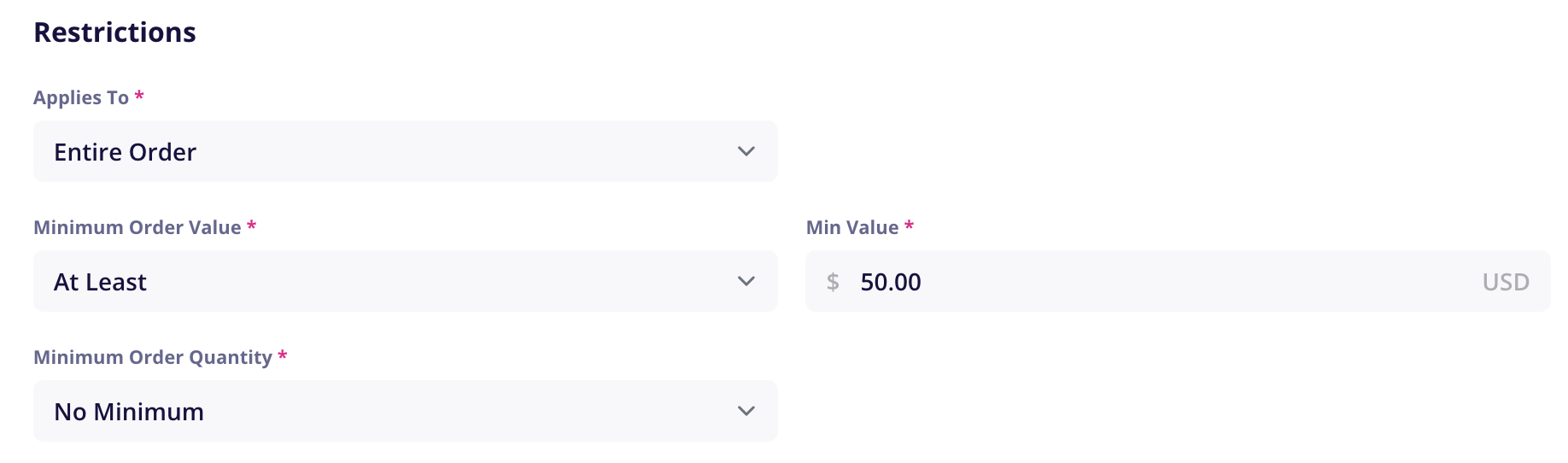
Save your discount and it will be activated and ready to use by your customers!
Now whenever a customer adds $50+ to their order, they will get free shipping immediately. You can do similar things with offering a discount on bulk orders over certain sizes, and more!
Can I override an automatic discount?
Automatic discounts cannot be removed from an order once they are applied, however they can be overridden:
Larger Value Automatic Coupon: if 2 automatic coupons apply, the larger value discount will be applied automatically
Manual Coupons: if the customer applies a manual coupon code at checkout, it will override the automatic discount – regardless of whether it is larger or smaller in value