The Public API lets you read and write your store's data from your own systems — products, variants, inventory, orders, and webhooks. Use it to connect CartGenie to an ERP, a warehouse or 3PL, a point-of-sale system, a product feed, an internal dashboard, or anything else that needs your store data.
Full API reference: https://api.cartgenie.com/public-api-docs
View CartGenie API DocsA Postman collection and an OpenAPI spec are also available from that page if you'd rather import the endpoints directly into your tooling.

Go to Settings → API Tokens in your CartGenie dashboard.
Enter a name for the token. Use something that identifies what it's for — NetSuite inventory sync, ShipBob fulfillment, Internal reporting. If you ever need to revoke access for one integration, the name is how you'll find it.
Select the scopes the integration needs (see below). Grant only what it actually uses.
Click Create token.
Copy the token and store it somewhere safe. It's shown once and cannot be viewed again. If you lose it, you'll need to delete the token and create a new one.


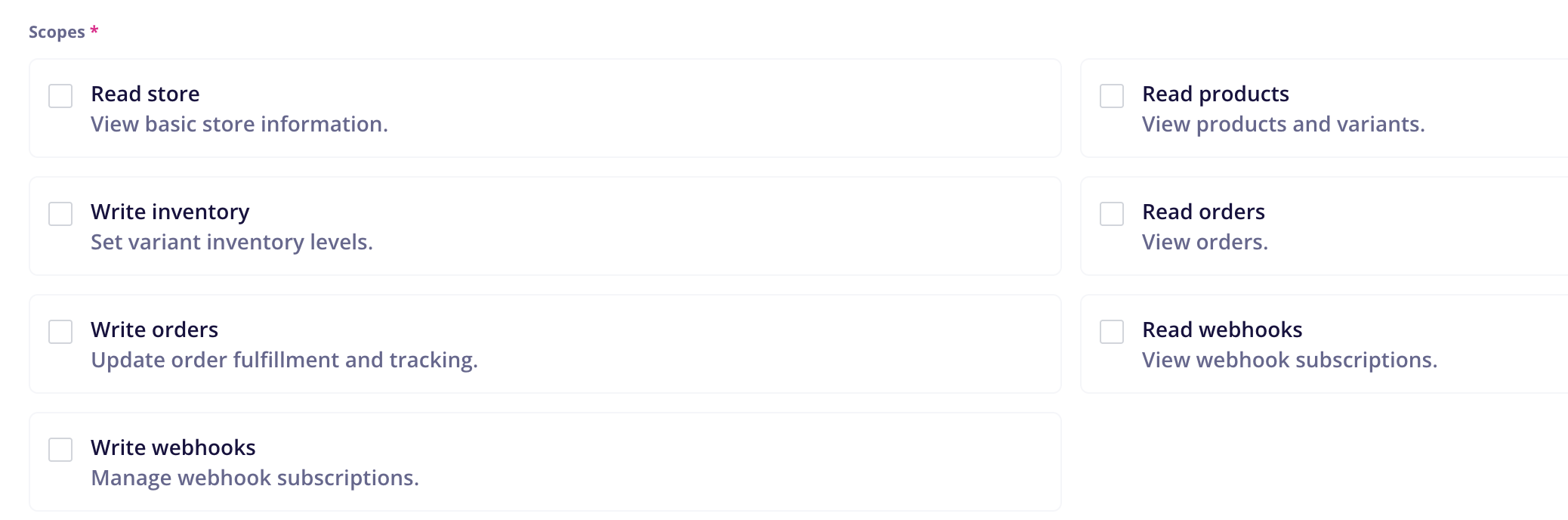
Deleting the token immediately ends access. Removing the team member who created it does the same thing, because a token inherits that member's store permissions as well as its own scopes. A request succeeds only when both the token's scope and the creating member's role allow it.
We’ve created a prompt you can use a template in any AI coder such as Claude Code, Cursor, Codex, etc.
Get API Prompt for AIScope | What it allows | Endpoints |
Read store | View basic store information |
|
Read products | View products and variants |
|
Write inventory | Set variant inventory levels |
|
Read orders | View orders |
|
Write orders | Update order fulfillment and tracking |
|
Read webhooks | View webhook subscriptions |
|
Write webhooks | Manage webhook subscriptions |
|
A request made without the required scope returns 403.
A note on pairing scopes: the write scopes usually need a read scope alongside them to be useful. To set inventory you first have to find the variant, which needs Read products. To fulfill an order you have to find the order, which needs Read orders. Granting a write scope on its own generally won't get an integration working.
Every request needs an Authorization header:
Authorization: Bearer YOUR_API_TOKENThe base URL is https://api.cartgenie.com, and all endpoints live under /public/v1/.
GET /public/v1/store is the quickest way to confirm everything is wired up. A 200 means the token is valid, the Public API is enabled for your store, and the token's owner still has access.
curl --request GET \
  "https://api.cartgenie.com/public/v1/store" \
  --header "Authorization: Bearer YOUR_API_TOKEN" \
  --header "Accept: application/json"
{
"name": "Example Store",
"domain": "https://example.webflow.io",
"currency": "usd",
"timezone": "UTC",
"created_at": "2025-11-02T08:31:00.000000Z"
}Keep CartGenie stock levels in step with an outside system of record.
Look up the variant by your own SKU, then set its stock level:
# 1. Resolve your SKU to a CartGenie variant
curl --get "https://api.cartgenie.com/public/v1/variants" \
  --data-urlencode "sku=TEE-BLK-M" \
  --header "Authorization: Bearer YOUR_API_TOKEN"

# 2. Set the new level
curl --request PUT \
  "https://api.cartgenie.com/public/v1/variants/2301/inventory" \
  --header "Authorization: Bearer YOUR_API_TOKEN" \
  --header "Content-Type: application/json" \
  --data '{"stock": 120, "expected_stock": 118}'
Three things to know:
stock is absolute, not an increment. Sending 10 sets the level to 10; it doesn't add 10.
expected_stock is optional but recommended. It makes the write conditional — if the stored level no longer matches what you last read, the request fails with 409 and changes nothing. The error response includes actual_stock, so you can retry without an extra read. Without it, you risk overwriting a sale that landed between your read and your write.
SKUs aren't unique within a store, so GET /variants?sku= always returns an array. Match on the fields you need rather than assuming a single result.
The variant must be published and have inventory tracking enabled, or the write is rejected.
Scopes: Read products + Write inventory
Pull orders that need shipping, then push tracking back when they go out.
# Fulfill an order and record the shipment in one call
curl --request POST \
  "https://api.cartgenie.com/public/v1/orders/1002/fulfill" \
  --header "Authorization: Bearer YOUR_API_TOKEN" \
  --header "Content-Type: application/json" \
  --data '{
    "shipping_carrier": "DHL",
    "tracking_number": "JD014600006281230542",
    "tracking_url": "https://www.dhl.com/track?id=JD014600006281230542",
    "send_notification": true
  }'
send_notification: true emails the customer that their order shipped. It defaults to false.
You can also add or replace tracking separately with PATCH /orders/{orderName}/tracking, return an order to unfulfilled with POST .../unfulfill, or cancel with POST .../cancel.
Note that cancelling is a status change only. It does not refund the payment, return stock to inventory, remove fulfillments, or cancel subscriptions created by the order. Handle those separately if your process needs them.
Scopes: Read orders + Write orders
Push your catalog to Google Merchant Center, a Meta catalog, an Algolia index, or a marketplace listing.
Do a full pull once, then poll incrementally with updated_since:
curl --get "https://api.cartgenie.com/public/v1/products" \
  --data-urlencode "updated_since=2026-08-01T00:00:00Z" \
  --data-urlencode "limit=100" \
  --header "Authorization: Bearer YOUR_API_TOKEN"
The incremental feed reports removals as well as changes. Read deleted_at before any other field — a record carrying one should be dropped from your copy, whatever its status. Removed products may arrive in either of two shapes: an archived product keeps its full structure, while a permanently deleted one collapses to just id, name, slug, status, deleted_at, and updated_at. Code that reaches straight for price or variants will break on the second shape.
Because a permanent removal isn't guaranteed to reach the feed, reconcile against a full listing on a schedule — weekly is usually enough.
Scopes: Read products
Pull orders into a spreadsheet, a BI tool, or an accounting system.
curl --get "https://api.cartgenie.com/public/v1/orders" \
  --data-urlencode "updated_since=2026-08-01T00:00:00Z" \
  --header "Authorization: Bearer YOUR_API_TOKEN"
Orders are never deleted, so a cancelled order shows up as a status change rather than a disappearance. Money values are returned in the smallest currency unit — 4900 is $49.00 — alongside pre-formatted formatted_* strings if you'd rather display those directly.
Some fields are only as complete as the order is. shipment is an object on orders with shippable items and an empty array on digital-only orders. A refunds array appears only when the payment status is refunded or partially_refunded — treat its absence as "nothing refunded" rather than an error. payment.method and transaction_id are null until the gateway records them.
Scopes: Read orders
Instead of polling, have CartGenie call your endpoint when something happens.
curl --request POST \
  "https://api.cartgenie.com/public/v1/webhooks" \
  --header "Authorization: Bearer YOUR_API_TOKEN" \
  --header "Content-Type: application/json" \
  --data '{
    "name": "Order sync",
    "url": "https://example.com/hooks/cartgenie",
    "events": ["new_order", "order_updated"]
  }'
Available events include new_order, order_updated, order_fulfillment_updated, new_customer, customer_updated, new_subscription, subscription_updated, new_subscription_charge, new_discount, discount_updated, new_category, category_updated, new_product, product_updated, new_abandoned_cart, refund_issued, and inventory_updated.
Your endpoint must be publicly reachable over HTTPS — private and loopback addresses are rejected.
Verify every delivery. The request body arrives as {"type": "<event>", "payload": { ... }} with a Signature header containing an HMAC-SHA256 of the raw JSON body, keyed with your store's webhook secret from Settings → Webhooks. Compute the same digest over the body you received and compare before trusting it. Always hash the raw body exactly as received — re-serializing the JSON first will produce a different digest and your check will fail.
Deliveries are attempted up to 3 times with exponential backoff and a 10-second timeout, so your endpoint should respond quickly and be safe to receive the same event twice.
Once your subscription exists, POST /webhooks/{id}/test queues a single delivery carrying sample data. Use it to verify your endpoint and signature check before real traffic arrives.
Scopes: Write webhooks (plus Read webhooks to list or inspect them)
List endpoints are cursor-paginated. Pass limit (1–250, default 50) and read meta.next_cursor from the response, then send that value back as cursor for the next page. When meta.has_more is false, you've reached the end.
Cursors are opaque — don't build or modify them.
products, variants, and orders all accept updated_since as an ISO-8601 timestamp. Combined with pagination, this gives you an incremental feed of everything that changed since your last poll. Store the timestamp of each successful run and use it as the starting point for the next one.
120 requests per minute and 4 per second, per token. Every response carries X-RateLimit-Limit and X-RateLimit-Remaining. Exceeding either limit returns 429 — back off and retry rather than hammering.
If you're syncing a large catalog, raising limit toward 250 will move more records per request and keep you well inside the limit.
Failures return a JSON body with a message field.
Code
Meaning
| Token is missing or invalid |
| The token, or the member who created it, lacks the required scope or permission |
| The record doesn't exist, or the Public API isn't enabled for your store |
| Conflicts with current state — a stale |
| Validation failed; details are in an |
| Rate limit exceeded |
Requests are validated strictly. Any parameter an endpoint doesn't define is rejected with a 422 rather than ignored, so send only the documented fields. Reading a record, changing one value, and posting the whole object back will fail — build your request body from scratch with just the fields you're changing.
The full API reference has complete request and response examples for every endpoint in bash, JavaScript, and PHP. If something isn't behaving the way this guide describes, reach out to support with the endpoint, the request you sent, and the response you got back.