CartGenie’s real-time shipping rates feature shows customers at checkout what a carrier will actually charge to ship their order to their address, such as "UPS Ground $11.42" or "USPS Priority Mail $9.85", instead of a custom price you set in advance. This amount is calculated automatically behind the scenes using the purchased items’ weights, box size, and the distance the items must be shipped.
Why use them:
Accurate prices. Nearby customers aren't overcharged and distant ones aren't undercharged.
Less upkeep. You don't have to build and maintain rate tables by weight or region.
More choice. Customers pick the carrier and speed that suits them.
Real-time rates work alongside your custom shipping rates. Methods like Local Pickup, Free Shipping over $100, or a flat rate still appear in the same list as the carrier rates.
Real-time rates are currently available through Shippo only.
To use real-time rates you need:
A connected Shippo account with at least one carrier enabled.
A weight on every product and every variant that has shipping enabled in CartGenie.
At least one shipping box, set as your default.
A complete business address in Business Info. Rates are calculated from this address, so it should be the place you ship from. Weights and box dimensions use the units set there too.

Follow our guide to connecting Shippo to CartGenie
Integrating CartGenie with Shippo
Connect your Shippo account to start purchasing labels and shipping products
In Shippo, open Settings > Carriers and turn on the carriers you want to offer. Every service from every enabled & applicable carrier can show at checkout, so fewer carriers means a shorter list.
Make sure your business address in CartGenie is where you ship from, and that your weight and dimension units further down the page are correct.
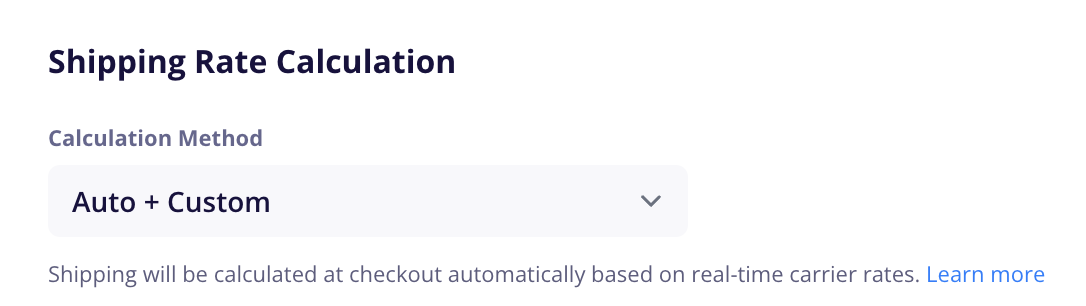
In Settings > Shipping, set Calculation Method to Auto + Custom. If Shippo isn't connected, it switches back to Custom.
Under Shipping Boxes, add your default box, plus a box for each ships-alone product that needs a different size. See “Shipping Box” section further below for an explanation of each field.

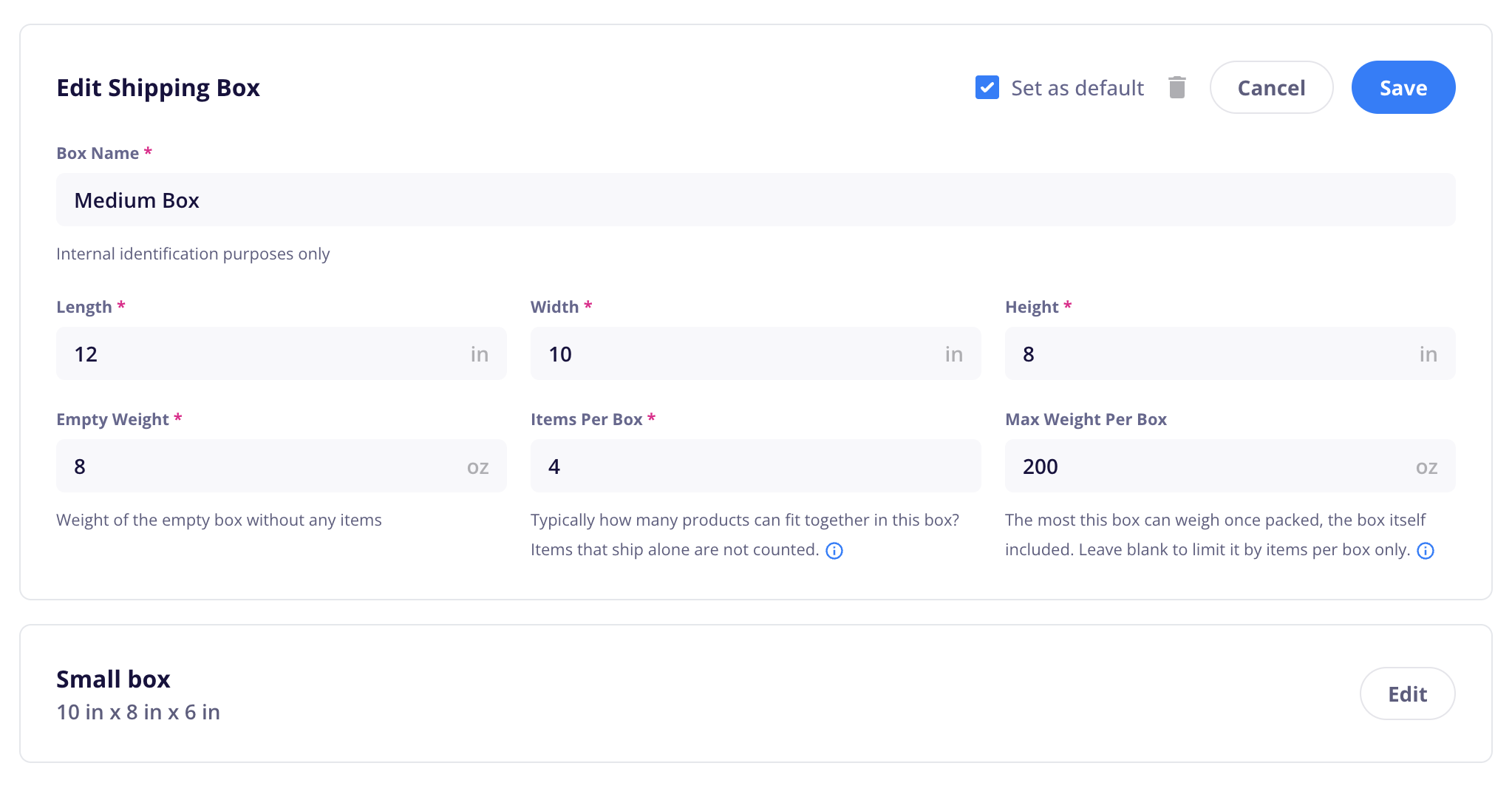
Note: You don’t need to actually ship the item(s) in this exact box. Set the default box size to one that you use most often when fulfilling orders for the most accurate costs.
Open each shippable product and make sure it and each of its shippable variants has a weight value. The product dimensions are not used to calculate shipping boxes needed, so they are optional.
See Your Products That Need Weights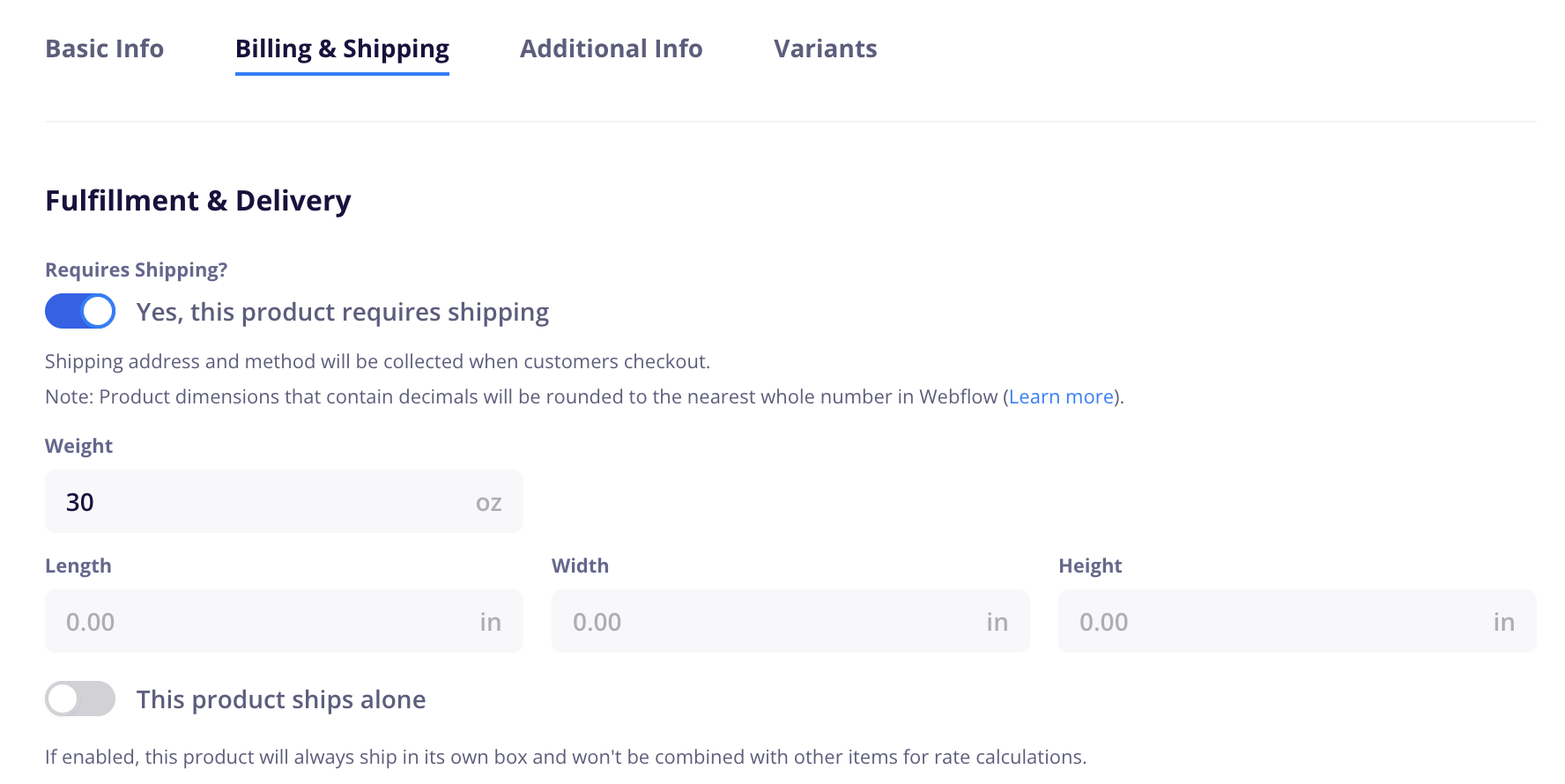
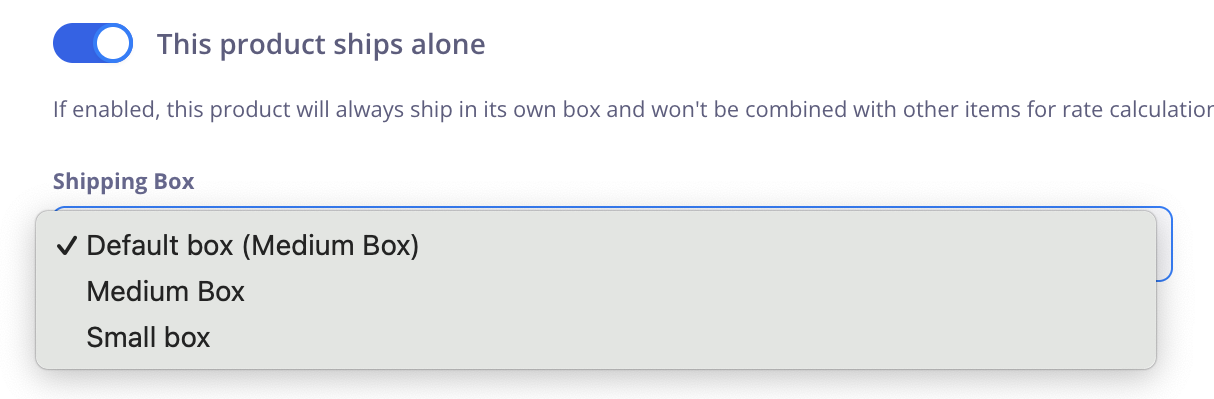
If a product is very large or heavy and should be shipped alone, you can enable the This product ships alone toggle and choose a custom box for it.
Each shipping zone in CartGenie now has a Carrier Shipping Rates method. You can disable it for specific shipping zones if you wish or restrict to specific US States or postal codes (we suggest keeping it unrestricted).


On your site, add a shippable item to cart and proceed to checkout. Fill in your shipping information and ensure the live rates appear at checkout!
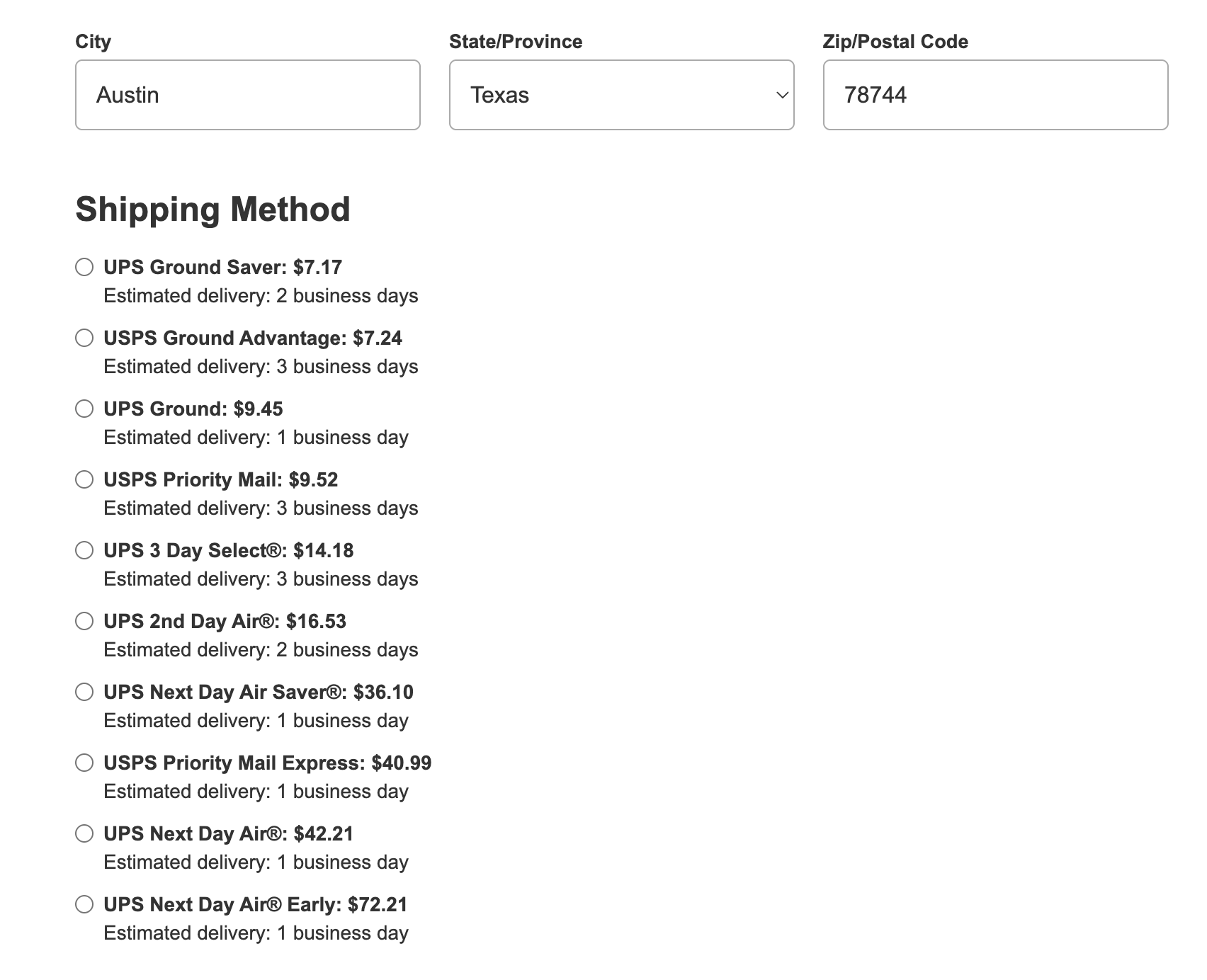
Once the customer enters a shipping address, the shipping options list shows your custom methods for their zone plus each carrier service Shippo returns, such as "UPS Ground" with its price. Carrier rates are listed cheapest first. Customers can choose one and check out as usual.
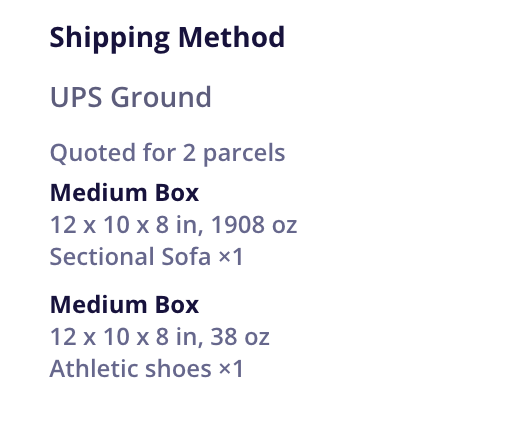
In CartGenie, the order detail panel shows the carrier service the customer chose (for example "UPS Ground") and the boxes used for the quote.
In Shippo, the order arrives the same way as orders with custom methods, with a note listing the service the customer paid for and the quoted packages.
Note: Placing an order doesn't buy a shipping label. You buy the label in Shippo as you normally would. Shippo's API doesn't let CartGenie pre-fill the box dimensions or select the rate, so use the note to pick the matching service and enter your package details.
If an order was quoted as more than one box, the Shipping info section of the order detail panel shows which items go in each box.
By default, CartGenie sends all shippable items to Shippo as a single order. This could make fulfilling in Shippo difficult if you want to split into multiple boxes. See our guide below on how to send separate shipments to Shippo from a single order:
Send Shipments to Shippo ManuallyTo ship the boxes separately in Shippo:
In your Shippo settings in CartGenie, choose Manually send orders to Shippo. See our guide
From the order, send each box's items to Shippo separately, so each box arrives in Shippo as its own order with its own label.
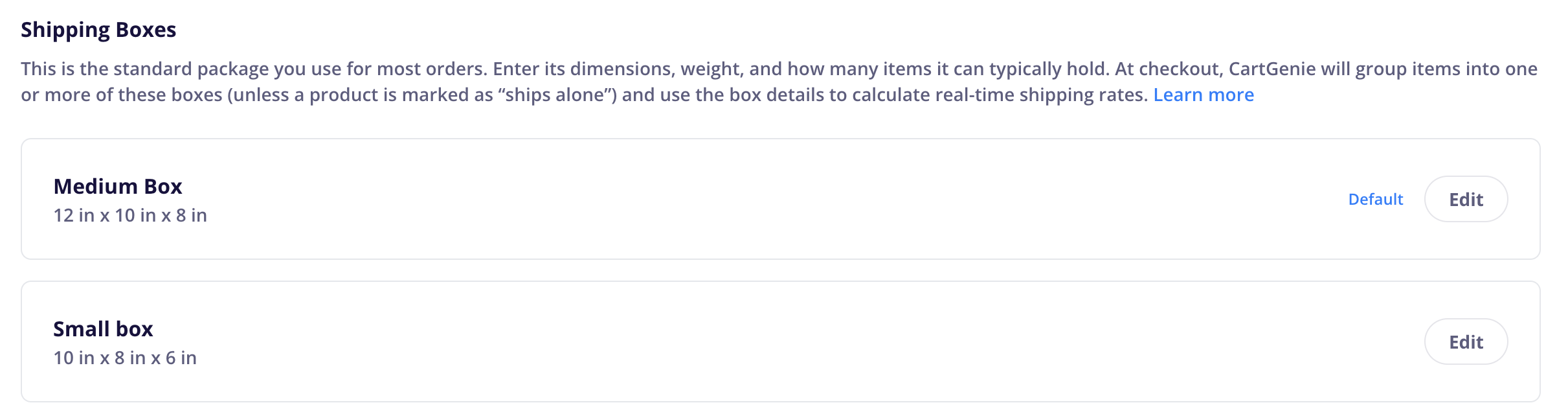
Shipping boxes tell CartGenie what you pack orders in. CartGenie uses them to work out how many packages an order needs and what each one measures and weighs, which is what carriers price on.
Your default box is the box you use for most orders. Every item that doesn't ship alone is packed into copies of it. You can add more boxes, but non-default boxes are only used by products marked "Ships alone".
Find boxes in Settings > Shipping, under Shipping Boxes. This section appears once Calculation Method is set to Auto + Custom.
Field | What to enter |
|---|---|
Name | A label you'll recognize, such as "Medium mailer" |
Length, Width, Height | The outside dimensions of the box |
Empty weight | The empty box plus typical packing material |
Max items per box | How many items typically fit. Leave blank to pack by max weight only. |
Max weight per box | The most a packed box should weigh, including the box itself. Leave blank to pack by item count only. |
Default box | On for the box used for most orders. One box must be the default. |
Tip: Carriers charge for size as well as weight (called dimensional weight). A box larger than you really use can raise every quote, so measure carefully.
If a package (box + items) goes over a carrier’s limit, that carrier won’t return rates for the order.
USPS: 70 lb max. 130" max length plus girth (108" for Priority Mail).
UPS and FedEx Ground: 150 lb max. 108" max length. 165" max length plus girth.
UPS Ground Saver and FedEx Ground Economy: 70 lb max. 130" max length plus girth.
FedEx International: 150 lb max. 108" max length. 130" max length plus girth.
DHL Express: 70 kg (154 lb) max. 120 × 80 × 80 cm max.
Length is the longest side. Girth is 2 × width + 2 × height. Limits apply to the packed box, including the box’s empty weight.
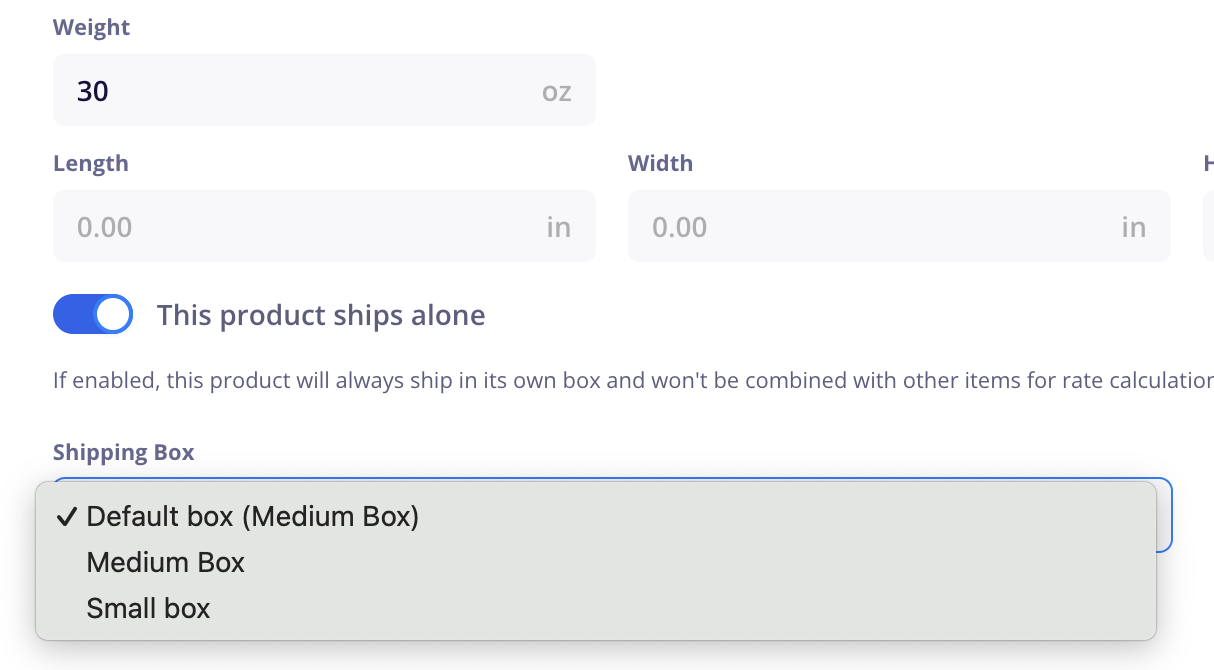
Turn on This product ships alone in the product editor for items that never share a box, such as flat-pack furniture or anything that goes out in its own carton. Then choose the shipping box it uses.
A ships-alone product always gets its own package, one per unit. If a customer orders 3, CartGenie quotes 3 packages. Each uses the selected box's dimensions and weighs the box's empty weight plus one item.
Ships alone is off by default, so products are grouped into default boxes unless you turn it on.
If an item is heavier than your default box can hold, CartGenie quotes it as its own package automatically. For items like this, turn on Ships alone yourself and assign a box that fits, so the quote uses the right dimensions.
When a customer enters a shipping address, CartGenie turns the cart into a set of packages, asks Shippo to price them, and shows the results.
Ships-alone items are set aside. Each unit of a ships-alone product becomes its own package in its assigned box.
Everything else goes into default boxes. CartGenie packs the heaviest items first, keeping each box within both its max items and max weight. It uses as many boxes as it takes to meet both limits. Bundles are packed as the products inside them.
Each package gets dimensions and a weight. Dimensions come from the box (product dimensions are ignored). Weight is the items inside plus the box's empty weight, which is added to every package.
CartGenie asks Shippo for rates from your Business Info address to the customer's address, for all packages, across every carrier you've enabled in Shippo.
Rates are combined per service. For a multi-package order, each service's price is the total across all packages. A service only appears if it can ship every package. If FedEx Ground can't take one of the boxes, FedEx Ground isn't offered for that order.
Your default box holds 3 items, has a 10 lb max weight, and weighs 1 lb empty. That leaves room for 9 lb of product per box. A customer orders 6 items that weigh 4 lb each.
By item count: 6 items ÷ 3 per box = 2 boxes.
By weight: only 2 items (8 lb) fit under 9 lb, so 6 items need 3 boxes.
CartGenie uses whichever needs more boxes, so it quotes 3 boxes of 9 lb each (8 lb of product plus the 1 lb box). If the customer also adds one ships-alone chair, that's a fourth package in the chair's assigned box.
These are estimates based on your box settings. If you pack an order differently, the label you buy may cost more or less than the customer paid.
Check these in order:
Calculation Method in Settings > Shipping is set to Auto + Custom, and Shippo is connected.
At least one carrier is turned on in your Shippo account.
You have a default shipping box.
Every product in the cart is set to Requires Shipping and has a weight, including the variant the customer picked. One item without a weight hides carrier rates for the whole cart. See all your items that need weights.
The Carrier Shipping Rates method is on in the customer's zone and isn't restricted away from their state or postal code.
Your Business Info address is complete.
The customer's address is complete and falls inside one of your shipping zones.
A service only appears if it can ship every package in the order. If one box is over that carrier's size or weight limit, the service is dropped for the whole order. Check your box dimensions, max weight, and any ships-alone products.
Check your box dimensions (carriers charge for size), empty box weight, product weights, and the units in Business Info. A misplaced decimal, or ounces entered as pounds, is the usual cause. You can also adjust the total cost by making a few adjustments to your settings:
Increase shipping cost: Reduce max items / weight per box
Decrease shipping cost: Increase max items / weight per box
Can I offer only real-time rates, with no custom methods? You can; however, without a custom method, customers can't check out if their cart has a product without a weight or if Shippo is unavailable. So either add a custom method or be sure to add weights to all shippable products.
Will customers pay exactly what my label costs? Customers pay the rate Shippo quoted for the estimated packages. If you ship in a different box, or a package weighs more or less than estimated, the label price can differ.
Can I ship from an address other than my business address? Not currently. Rates are always calculated from your Business Info address. Let us know if this is an issue for you and we can try to build in a feature to handle this.
How are bundles handled? Bundles are packed as the products inside them, so each of those products needs a weight.
Do quantities count? Yes. Every unit counts toward a box's item and weight limits, and ships-alone products get one package per unit.
Does this buy shipping labels automatically? No. You still buy labels in Shippo. This feature just helps better estimate the actual shipping cost for the order.